Multi-Tenancy and Tenant Management
Architecture
Each tenant (organisation/account) has:
- A row in
forecastai_master.master.accounts - A dedicated PostgreSQL database (or a separate schema in a shared database)
- A
scenarioschema containing all the tenant's data - Completely isolated data — no cross-tenant queries are possible
The forecastai_master database holds:
-- master.accounts: one row per tenant
CREATE TABLE master.accounts (
    id              UUID PRIMARY KEY,
    name            TEXT NOT NULL,        -- display name shown in the UI
    db_name         TEXT NOT NULL,        -- PostgreSQL database name
    schema_name     TEXT DEFAULT 'scenario',
    connection_params JSONB,              -- host/port/user/password overrides
    is_active       BOOLEAN DEFAULT TRUE,
    created_at      TIMESTAMPTZ DEFAULT NOW()
);

-- master.superadmins: cross-tenant admin users
CREATE TABLE master.superadmins (
    id              SERIAL PRIMARY KEY,
    email           TEXT UNIQUE NOT NULL,
    name            TEXT,
    password_hash   TEXT NOT NULL,
    created_at      TIMESTAMPTZ DEFAULT NOW()
);
Account Cache
At startup, the API loads all active accounts from master.accounts into an in-memory cache (_account_cache). This cache maps account_id (UUID) to the database connection parameters.
On every authenticated request, the JWTAuthMiddleware decodes the JWT's account_id, looks up the connection config from _account_cache, and sets a per-request context variable via set_account_context(). All DB queries then resolve to the correct tenant DB transparently.
To refresh the cache after provisioning a new tenant:
Provisioning a New Tenant
Via the Admin Panel (/admin)
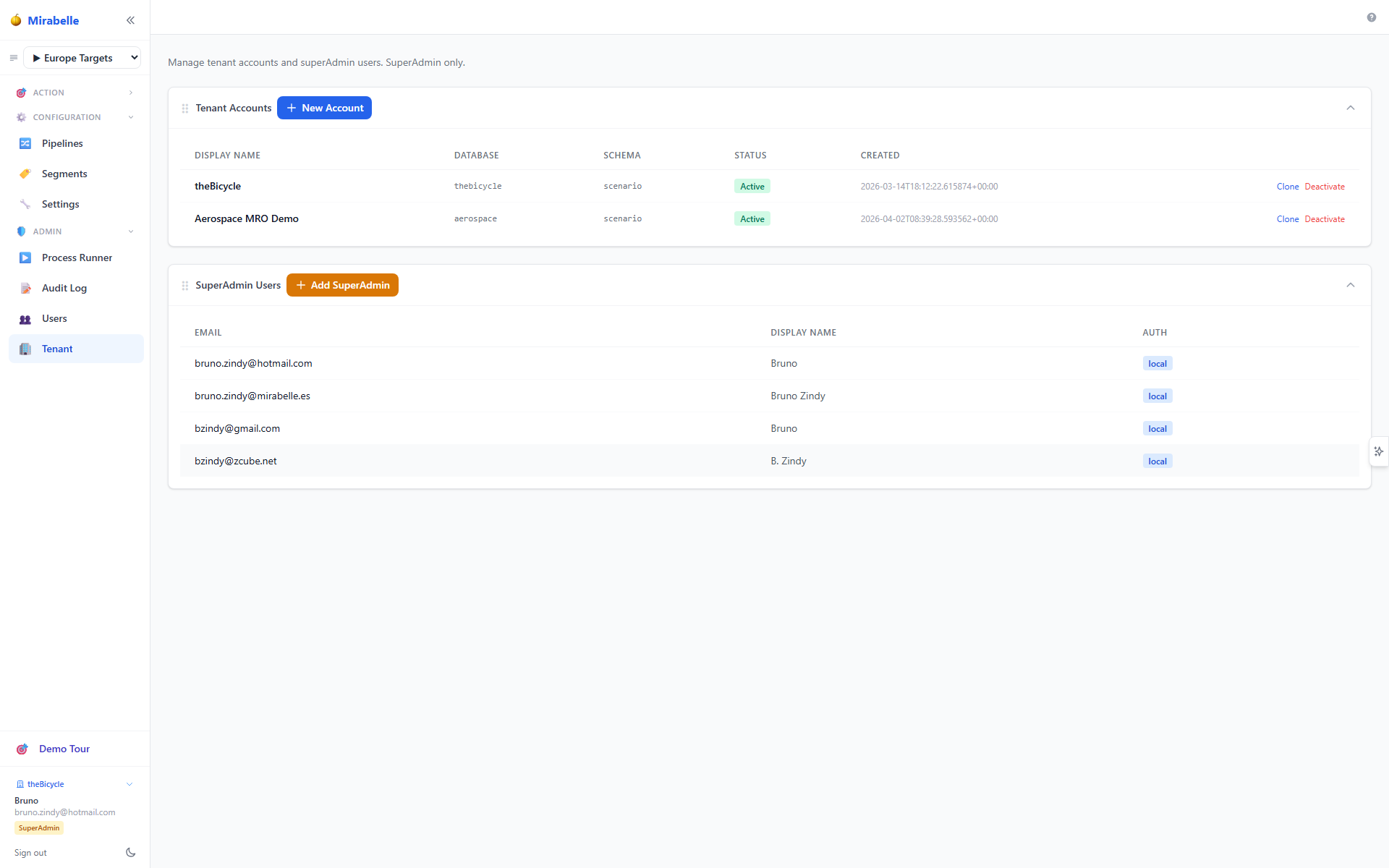
- Log in as a superAdmin.
- Navigate to Tenant (
/admin). - Click Add tenant.
- Fill in the organisation name, database name, and connection details (if different from the master DB host).
- Click Provision — this:
- Creates a row in
master.accounts - Creates the new PostgreSQL database
- Runs
files/DDL/schema.sqlto create all tables - Refreshes the account cache
Provisioning runs as a background job. Check the status:
Via the API
POST /api/admin/accounts
Authorization: Bearer <superadmin-token>
Content-Type: application/json

{
  "name": "ACME Corporation",
  "db_name": "forecastai_acme",
  "connection_params": {
    "host": "127.0.0.1",
    "port": 5432,
    "user": "postgres",
    "password": "secret"
  }
}
Response:
Cloning a Tenant
Clone a tenant's schema data (useful for creating a staging environment from a production tenant):
POST /api/admin/accounts/{account_id}/clone
Authorization: Bearer <superadmin-token>
Content-Type: application/json

{
  "name": "ACME Staging",
  "db_name": "forecastai_acme_staging"
}
This copies the schema structure and reference data (parameters, segments, item/site master) but excludes sensitive user data.
Deleting a Tenant
This is irreversible
Deleting a tenant permanently removes the account from master.accounts and drops the tenant database. There is no undo.
Running Migrations
When the scenario schema is updated (new columns, new tables), run the migration scripts:
This applies any pending DDL changes to all active tenant schemas.
Alternatively, apply SQL migrations directly:
User–Account Assignments
A user's email may be associated with multiple tenant accounts (e.g. a consultant working with multiple clients). The master DB tracks these assignments:
List assignments for a user
Update assignments
PUT /api/admin/users/{email}/accounts
Authorization: Bearer <superadmin-token>
Content-Type: application/json

{
  "account_ids": ["uuid-tenant-a", "uuid-tenant-b"]
}
After updating, the user can switch between their assigned tenants from the sidebar account switcher.
Account Switcher (Frontend)
When a user has access to multiple accounts:
- The sidebar shows their current account name as a clickable button.
- Clicking opens a dropdown listing all available accounts.
- Selecting a different account calls
POST /api/auth/switch-account, which issues a fresh JWT scoped to the chosen tenant. - The page reloads at
/for the new tenant.
This mechanism uses the /api/auth/probe?email=... endpoint on login to determine whether to show the account picker.
Troubleshooting: Cannot See the Tenant Nav Link
If a superAdmin logs in but the Tenant (🏢) link is missing from the sidebar, the most likely cause is password divergence between master.superadmins and scenario.sys_users.
SuperAdmin credentials are stored in the master database, while tenant user credentials live in each tenant database. These are independent stores — changing a password via the UI only updates the tenant DB. When the hashes diverge, verify_superadmin() fails and the login falls through to the tenant user path, issuing role: 'admin' instead of role: 'superadmin'.
To fix, sync the superadmin password hash from the tenant DB:
-- On the tenant DB:
SELECT hashed_password FROM scenario.sys_users WHERE email = 'user@example.com';

-- On forecastai_master:
UPDATE master.superadmins
SET hashed_password = '<hash-from-above>'
WHERE email = 'user@example.com';
See User Management → SuperAdmin Password Divergence for full diagnosis and prevention steps.